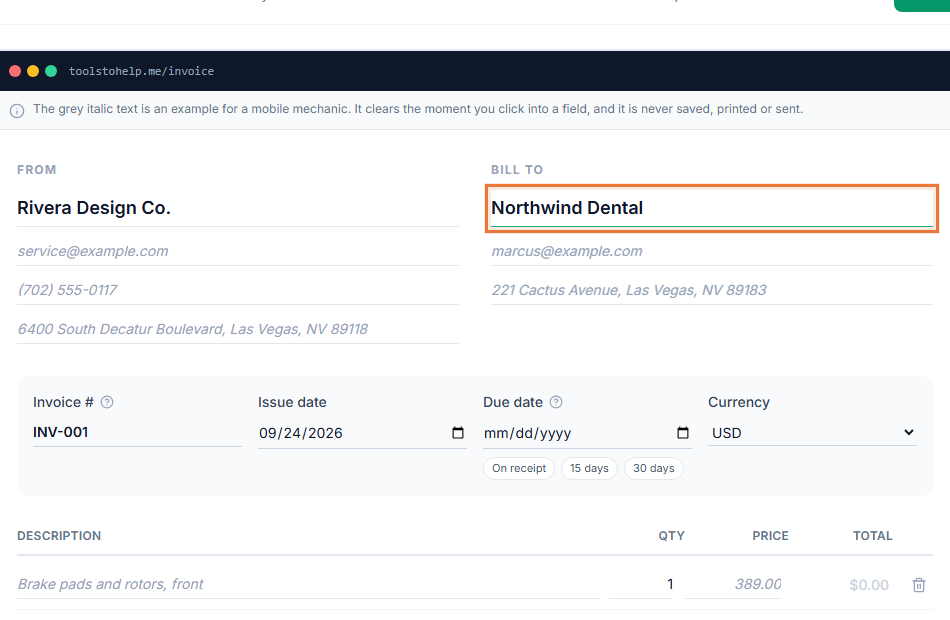
A freelance invoice does two jobs. It tells your client exactly what they are paying for, and it gives both of you a record for your books. A clear invoice also gets paid faster, because the client does not have to write back with questions.
Freelance invoice example
Here is a filled-in example for a freelance writer. Use it as a model: your own invoice needs the same parts, with your details and your work.
jordan@example.com
Portland, OR
Attn: Sam Ortiz
200 Market St, Suite 4
Seattle, WA 98101
TermsNet 14
| Description | Qty | Rate | Amount |
|---|---|---|---|
| Homepage copy, two rounds of edits | 1 | $900.00 | $900.00 |
| Product page copy (per page) | 4 | $250.00 | $1,000.00 |
| Extra edits requested after sign-off (hours) | 3 | $75.00 | $225.00 |
What to include on a freelance invoice
- Your business details. Your name or business name, email address and location. Add your logo if you have one.
- Your client's details. The company name, the person you work with, and their billing address.
- A unique invoice number. A simple sequence such as INV-2026-014 makes invoices easy to find later. See how to write an invoice for numbering ideas.
- The issue date and due date. The due date turns your payment terms into a real deadline.
- One line for each piece of work. Name the deliverable, not just "services". Show the quantity, the rate and the amount.
- Deposits already paid. Subtract them so the balance due is clear.
- Payment terms and methods. How long the client has to pay, and how they can pay you.
How to word your line items
Specific line items prevent most payment delays. Compare "Design work, $1,200" with "Logo design, three concepts and two rounds of revisions, $1,200". The second one matches what the client approved, so it gets approved for payment without a follow-up email.
- Project fee: describe the deliverable and the milestone, such as "Website redesign, milestone 2 of 3: page templates".
- Hourly work: give the task and the hours, such as "Copy edits, 3 hours at $75". If you track time, the hourly invoice template shows a fuller layout.
- Extras: list work outside the original scope on its own line, so the client can see why the total changed.
Payment terms that work for freelancers
- Net 14 or Net 30 for established clients. Shorter terms help your cash flow.
- A deposit of 25 to 50 percent before you start, for new clients or long projects.
- Milestone invoices for projects that run longer than a month, so you are not waiting until the end to be paid.
Whatever you choose, agree on it before the work starts and print it on every invoice. Invoice payment terms explained covers each option in detail.
Making the invoice with the Invoice Generator
- Open the Invoice Generator and start typing your details into the builder.
- Add your client and line items. The totals update as you type.
- Create a free account to save it. Your work is kept while you sign up. Your logo and accent color then appear on every invoice.
- Share it. Copy the invoice link into an email to your client, or download the PDF. You can see when your client opens the invoice.
If you track your hours in the app, you can turn unbilled time into invoice lines in one step. You can also add a Stripe payment link so the invoice shows a Pay now button.