Payment terms are the part of an invoice that says when you expect to be paid. Vague terms, or no terms at all, are one of the most common reasons invoices go unpaid late. This guide covers the common terms, what they mean, and how to choose between them.
Common payment terms, explained
- Due on receipt. Payment is expected as soon as the client receives the invoice. Common for small jobs, retail transactions, or clients you do not have an ongoing relationship with.
- Net 7, Net 15, Net 30, Net 60. Payment is due that many days after the invoice date. "Net 30" means payment is due 30 days after you issued the invoice, not 30 days after the work finished. Net 30 is the most common default for business-to-business work; Net 60 is more common with larger companies that batch their payments.
- EOM (end of month). Payment is due by the end of the calendar month the invoice was issued in, or sometimes the following month. Less common than a Net term, but you will see it in some industries.
- 2/10 Net 30. A combined term: the client gets a 2% discount if they pay within 10 days, otherwise the full amount is due within 30 days. Covered in more detail below.
Early payment discounts
An early payment discount rewards a client for paying faster than your normal terms require. The most common format is written as a fraction, like 2/10 Net 30: a 2% discount if paid within 10 days, full amount due within 30.
Discounts like this help cash flow for businesses that would rather have money sooner at a small discount than wait the full term. They are optional, and most invoices do not need one. They are most useful when you regularly work with clients who are slow to pay and might be nudged by a small incentive.
Late fees
A late fee is a charge added when payment arrives after the due date, often a flat amount or a percentage of the invoice, sometimes compounding for each additional period the balance stays unpaid.
Whether you can charge one, and how much, depends on your local law and on what you agreed with the client beforehand. A late fee generally needs to be stated on the invoice or in your contract before the due date passes, not added afterward as a surprise. Check the rules that apply where you and your client are located, or ask an accountant or attorney, before adding a late fee policy. This is not legal advice.
Deposits and upfront payment
For larger jobs, a deposit paid before work starts protects you if a client cancels partway through, and it filters out clients who were never serious. A common structure is a percentage upfront, such as 30 to 50%, with the remainder due on completion or under a Net term afterward.
State the deposit clearly on your estimate or contract, including what happens to it if the job is cancelled, before the work begins.
Choosing terms for your business
- New or one-off clients: due on receipt, or a short Net 7 to Net 15, reduces the risk of chasing an unfamiliar client for payment.
- Ongoing business clients: Net 30 is the common default and what most accounting departments expect to process.
- Large jobs or projects: a deposit upfront, with the balance on a Net term after completion.
- Slow-paying clients: shorten the term, ask for a deposit, or add an early payment discount rather than waiting and hoping it improves.
Setting terms on your invoice
 Inside Invoice Generator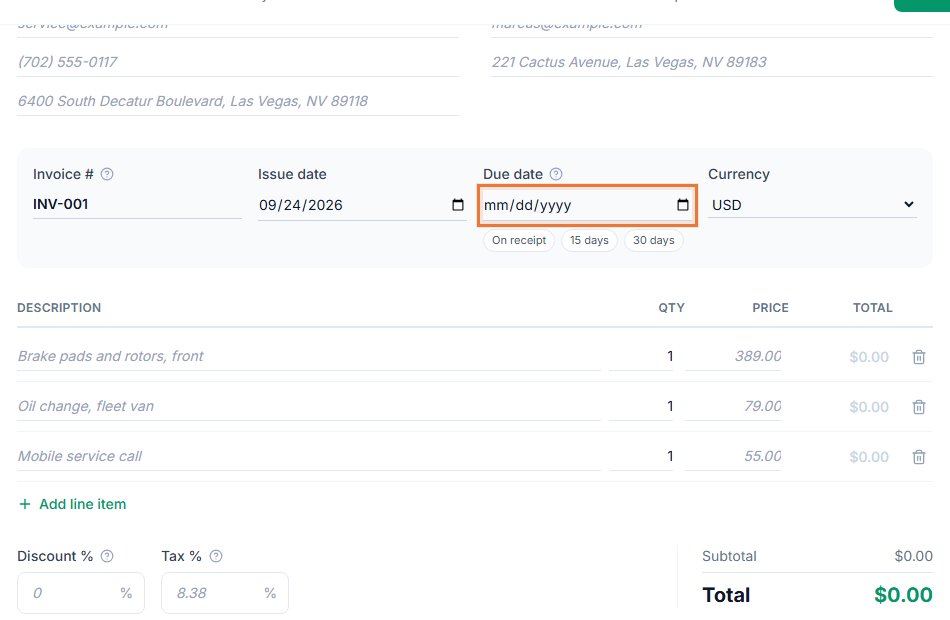
- Open the Invoice Generator. Start your invoice at toolstohelp.me/invoice/, open to everyone.
- Set the issue date. Your payment terms count from this date.
- Choose a due date. Pick due on receipt, or a due date that reflects your Net terms, such as 15 or 30 days out.
- State the terms in your notes. Spell them out in plain words too, for example "Net 30: payment due within 30 days of the invoice date," so there is no ambiguity.
- Save and share. Create a free account to save the invoice and get a link your client can open to view and pay.
Wording examples for your invoice
- "Payment due on receipt."
- "Net 30: payment due within 30 days of the invoice date."
- "2/10 Net 30: take a 2% discount if paid within 10 days. Full amount due within 30 days."
- "A late fee of [amount or percentage] applies to any balance unpaid after the due date."
- "A deposit of [amount] is due before work begins. The remaining balance is due on completion."
See how to write an invoice for everything else that belongs on the page alongside your terms.